Basics
- The goal. Two teams of up to six heroes (12 in Siege, and in Horde your party fights monsters instead). In Deathmatch you win a round by killing the whole enemy team. Win two rounds and the match is yours. Nobody respawns during a round.
- Bots on both sides. Your allies and your enemies are bots, also in the co-op Horde mode. You choose how well they play: Easy, Normal or Hard.
- Three roles. A Tank stands in front, Guards an ally and controls enemies. A Damage hero picks a target and kills it. A Healer keeps the team alive with heal skills. There are seven heroes in each role.
- Six abilities per hero. An auto-attack and five skills on Q W E R F. R is the ultimate: strong, with a long cooldown. Every tank has Guard on F.
- Your first match. Play Now jumps into a fight with your last picks. Custom Battle asks for the mode first, then your hero, team size and bot difficulty. Before your first match a card shows the controls for your role. Press H during a match to open it again.
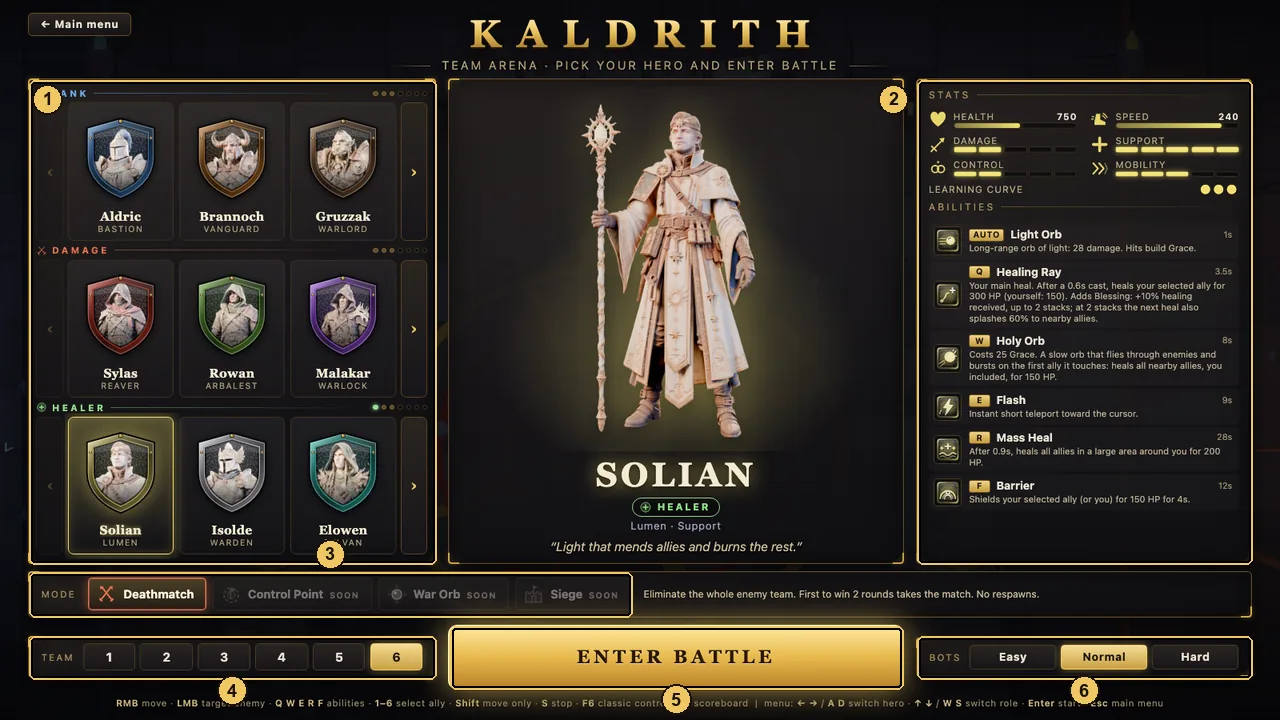
- Heroes by role: tanks, damage, healers. The arrows show more.
- Stats, learning curve and all six abilities of the selected hero.
- Mode. You now choose it on the screen before the hero. See Modes below.
- Team size, from 1v1 up to 6v6.
- Start the match.
- How well the bots play.
Controls
There are two control schemes. MOBA controls are the default. Press F6 in a match to switch to classic WASD and back. The game remembers your choice. Keys work by their position on the keyboard, so AZERTY and other layouts play the same.
MOBA controls (default)
Classic controls (F6)
Both schemes
Cast modes for aimed skills (F7)
- Key, then LMB (default). Press the key to see where the skill lands, LMB casts, RMB cancels.
- Hold and release. Hold the key to aim, let go to cast.
- Instant. The skill goes off at the cursor the moment you press the key.
Kaldrith is played with a keyboard and mouse on desktop. There are no touch or gamepad controls.
Aiming & targeting
- The skull. Click an enemy and a skull appears over its head, with a red beam of light so you can find it in a crowd. Your auto-attacks go to the skull whenever it is in range, and if it is only a little out of range you walk to it. The skull stays until the enemy dies or you mark someone else. If the enemy leaves the screen, an arrow on the edge shows where it is and how far.
- No skull? You hit the enemy in range nearest your cursor, even while running.
- Hidden enemies. If a skulled enemy goes into stealth, the skull waits, but you cannot hit them until they show up again.
- Aimed skills (zones on the ground, skillshots, cones, dashes) show a range ring and the area they hit. A grey outline means the skill is still on cooldown. Some skills fire at once, such as Rowan the Arbalest's Piercing Shot, which now goes off the moment you press the key.
- Ally and self skills (heals, shields, buffs, Guard) need no aiming and fire at once. They go to the tile under your cursor in the heal panel, otherwise to your selected ally, otherwise to the ally under the cursor, otherwise to you. If your selected ally is too far away or behind a wall, you see OUT OF RANGE and nothing is cast.
- Beams of light. Blue: the ally you Guard. Green: the ally your healer has selected. Red: your skull.
- Focus fire. When two or more heroes hit the same target within 2.5 seconds, it takes more damage: +20% with two attackers, +40% with three, +60% at most. FOCUS +N% appears over the target and on its frame. Gold means your team is focusing that enemy, red means an ally is being focused. Summons count as their owner.
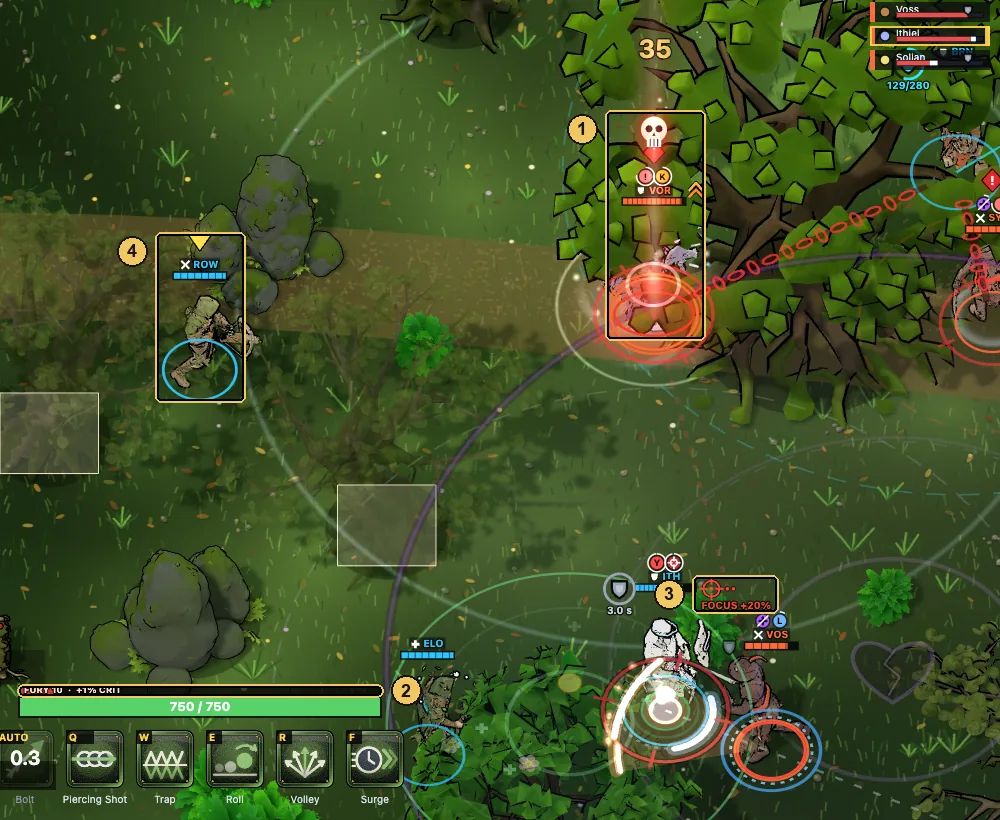
- Skull and red beam over your target.
- Fury, the damage resource, above your HP.
- FOCUS +20%: two enemies are hitting this hero.
- You. The yellow arrow always marks your hero.
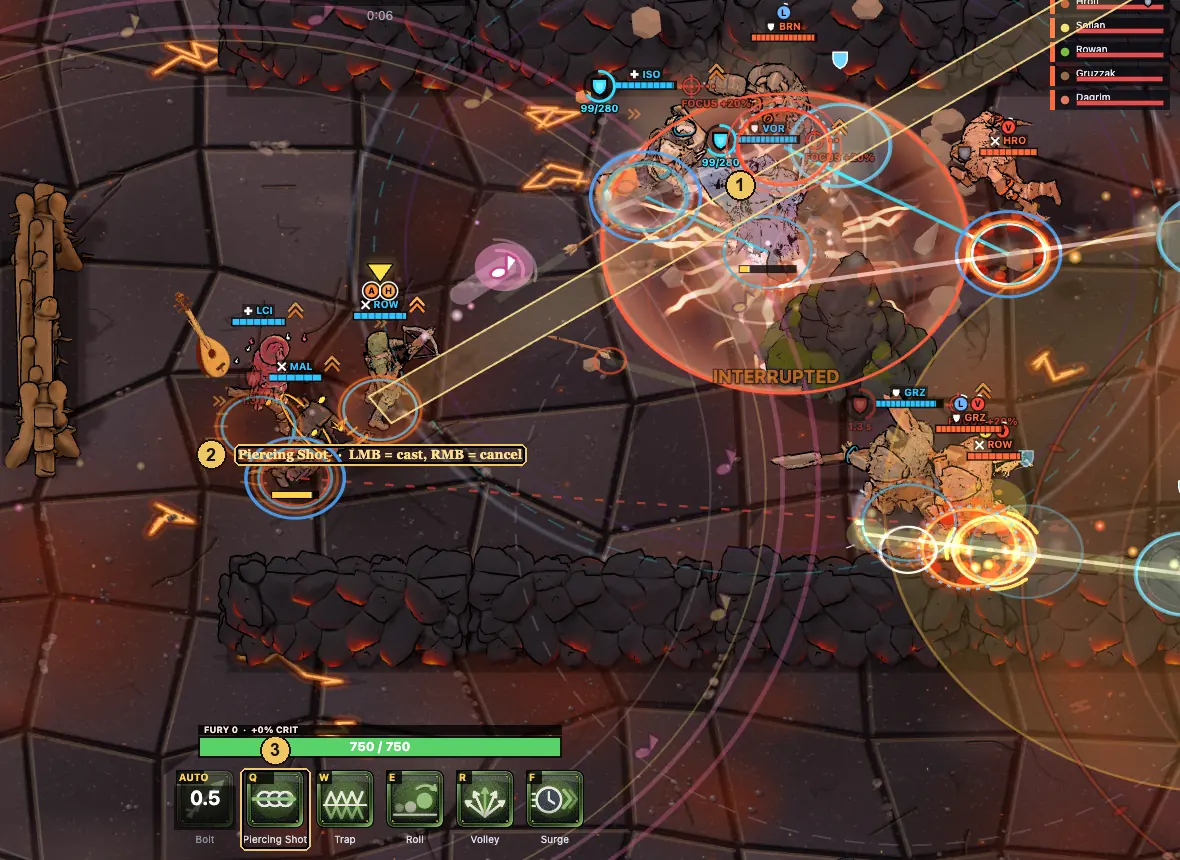
- The band shows where the skillshot will fly.
- Skill name and what to press: LMB casts, RMB cancels.
- The skill you are aiming is highlighted on the bar.
Roles
Each role has its own resource bar above your HP and its own panel on the screen. Learn to read yours and you know what to do next.
Tank
DefenderResolve. A steel-blue bar that builds when you take hits, block, absorb damage for your Guarded ally and interrupt casts. After 4 seconds without gains it fades. Skills with a number in the corner use that much Resolve for a stronger version, and the bar turns orange when you have enough.
- Guard (F). Select an ally with 1–6 or a click, then press F. While they stay inside the dashed ring around you, you take 50% of the damage they take. If they are outside it for 3 seconds, the Guard breaks.
- Intervention. When your Guarded ally drops below 30% HP, you knock their attackers back and give them a small shield. Ready again after 14 seconds. If they die anyway: Defender's Wrath, another knockback around their body.
- Overload. Absorb too much too fast and the Guard switches off for 2.5 seconds while you are slowed. The tension bar under the Guard line shows how close you are.
- Interrupts. Your auto-attack, strong knockbacks, pulls and stuns stop an enemy cast, and that ability goes on full cooldown.
- Peel. Your crowd control lasts 50% longer on anyone who hit your Guarded ally in the last 2 seconds.
- Hold the Line. Allies right behind you take 15% less damage from projectiles. Enemies walking through your front are slowed.
- Taunts. Taunted enemies deal 40% less damage to everyone but you, and bots must come for you.
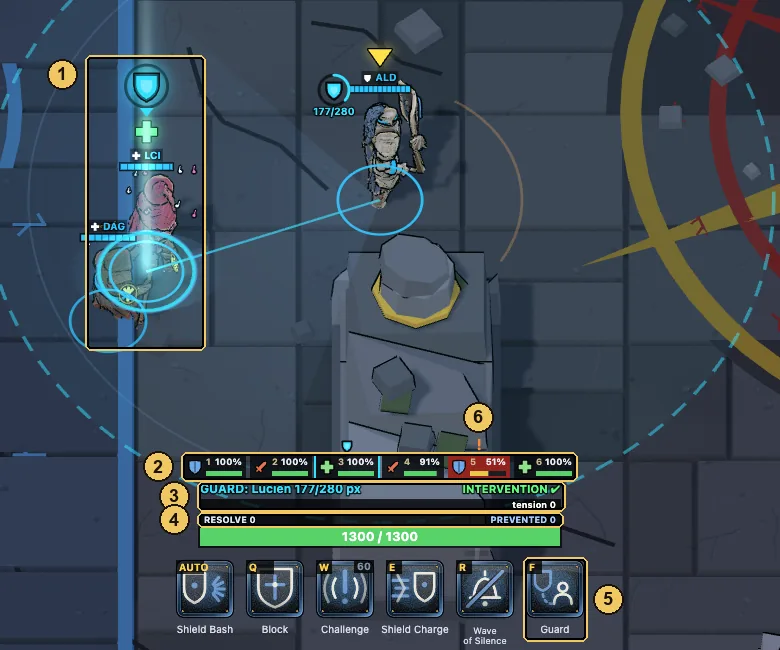
- Your Guarded ally: blue beam and a shield over their head.
- Team strip: HP of every ally. A red glow means they are taking damage.
- Guard line: who you Guard and how far they are, tension bar, Intervention ready.
- Resolve, and PREVENTED: damage you kept off your team.
- Guard is always on F.
- The "!" marks the ally under the most pressure. Move your Guard there.
Damage
StrikerFury. A red bar that fills as you hit enemies. A full bar gives +12% crit chance. Stop hitting for 3 seconds and it drains.
- Your job. Pick a target, skull it and kill it. The enemy healer and anyone already low are the usual picks. Tab moves the skull to the next enemy.
- Hit together. Focus fire on one target adds up to +60% damage. Spread damage gets healed.
- Wounded. Deal more than 25% of a hero's max HP within 4 seconds and their healing is halved for 3 seconds. Burst beats healers.
- Stay alive. Damage heroes have the least HP. Keep your escape skill for when an enemy tank or assassin comes for you.
Healer
SupportGrace. A gold bar. Every auto-attack hit gives +8, every skill hit +15, and it slowly refills during a fight. Strong heals cost Grace: the number in the icon corner, or "GRACE" on the icon when you are short. A full bar starts draining after 4 seconds, down to 50, so spend it.
- Heal with skills. Q is your main heal. Your auto-attack deals damage and builds Grace, so keep hitting between heals. Two exceptions: Isolde's mace strike also heals allies around her, and Dagrim's Rune Bolt heals an ally it hits.
- Pick who to heal. Press 1–6, click a frame, a heal tile or the ally, or press Tab for the ally with the lowest HP. Heals then go straight to them.
- Saves. Direct heals on an ally below 35% HP heal 60% more. You see SAVED.
- Blessing. Main heals leave Blessing: +10% healing received, up to 2 stacks. At 2 stacks the next main heal also splashes 60% to allies nearby. Gold dots over allies show the stacks.
- Two healers, one target. Healing from a second healer within 8 seconds of the first is 30% weaker. Split your targets.
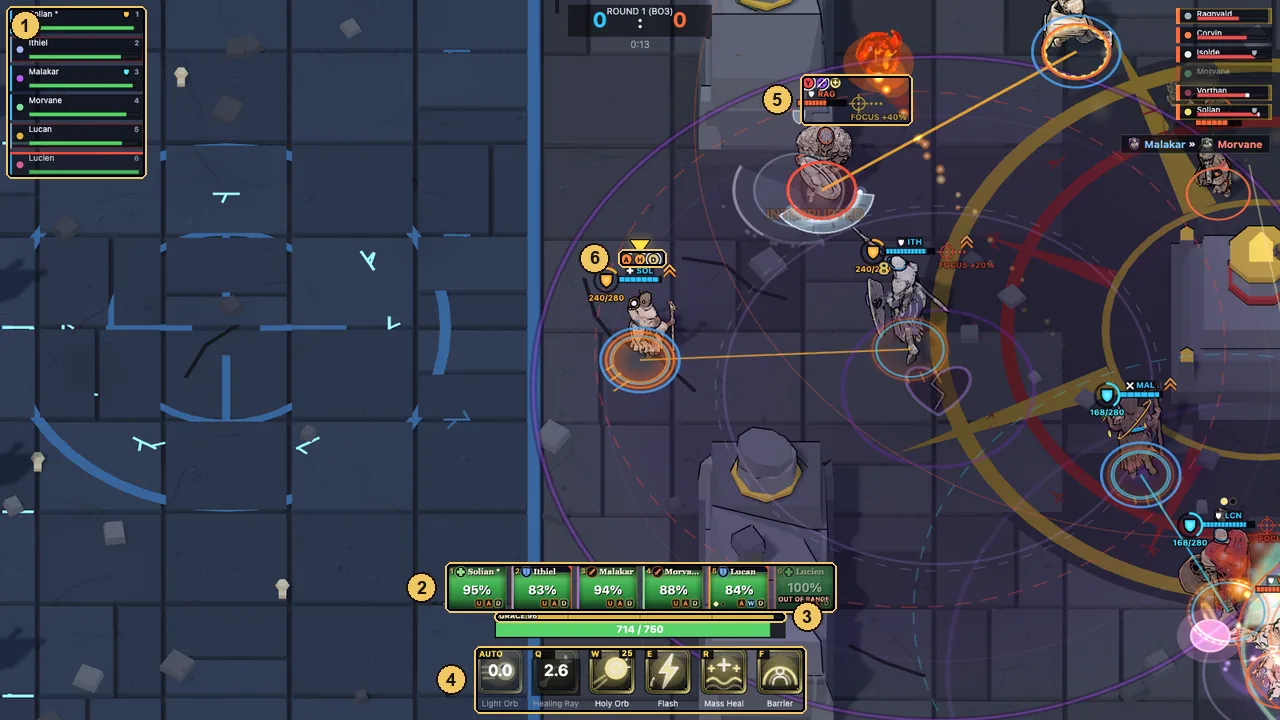
- Team frames with key numbers. A healer gets the large version.
- Heal panel: one tile per ally with HP, statuses and OUT OF RANGE. Click a tile to select; while aiming a heal, a click casts it there.
- Grace.
- Skills. The corner number is the Grace cost.
- FOCUS +40%: your team is focusing this enemy.
- Status icons over a hero.
Kill feed: the latest kills appear on the right, under the enemy list (killer » victim).
Rules of combat
- Crowd control. Stun, root, silence and fear. A stun, silence or fear also stops a cast in progress. When a stun, root, silence or fear wears off, the target is Immune to the next one for 5 seconds.
- Diminishing returns. The same kind of crowd control used again soon after is shorter: 70% of its time, then 49%, never below 20%. For slows the window is 10 seconds.
- Knockbacks and pulls. After a strong shove or pull, a hero cannot be moved again for 5 seconds. A knockback from an enemy also breaks channelled spells.
- Interrupts. A broken cast is lost. If a tank broke it, that ability also goes on full cooldown (INTERRUPTED).
- Shields soak damage before HP. They show as a cyan strip on the HP bar and a (+N) next to your HP.
- Block cuts damage from the front only. Damage over time ignores it.
- Invulnerable and untargetable heroes take no damage and cannot be knocked back.
- Stealth. Hidden enemies show as ??? on the frames. Their first hit out of stealth deals 30% more (AMBUSH).
- Overtime. After 90 seconds of fighting, Overtime builds up over 45 seconds: healing drops by up to 50% and damage keeps growing. Later every hero starts bleeding HP, so every round ends. If nobody is dealing much damage, the clock runs four times faster. The line under the round timer shows the current numbers.
- Water. You cannot walk through water, but projectiles and spells fly over it. Mirror Lake is built around this.
- Walls block movement, shots and heals. An ally behind a wall counts as out of range.
Status effects
Statuses show as small coloured icons over a hero's head and on the team frames. Where the two differ, both icons are shown (over the head first, then the frame) or the head icon is described.
- SStunCannot move, attack or cast.
- RRootCannot move, can still attack and cast.
- MSilenceNo skills, heals included.
- FFearRuns away from the source.
- LWSlowMoves slower.
- ZSlowed attacksAttacks come out slower. Over the head: an hourglass.
- !CTauntedDeals 40% less damage to anyone but the tank who taunted.
- YWoundedTook heavy damage fast: healing halved for 3 seconds.
- NReduced healingHeals on this hero are weaker, for example after Witch's Mark.
- TMarkedTakes extra damage from the hunter who marked them. Over the head: a red crosshair.
- XImmuneJust shook off crowd control: immune to the next one.
- DUnmovableCannot be knocked back or pulled for a moment.
- O+ShieldAbsorbs damage before HP.
- BBlockTakes less damage from the front.
- QReflectSends enemy projectiles back. Over the head: a shield with a flash.
- IInvulnerableTakes no damage.
- ~UntargetableCannot be hit or targeted.
- CHStealthHidden from enemies until close or until they attack.
- +RegenerationHeals over time.
- VLifestealPart of the damage dealt comes back as HP.
- UDamage upDeals more damage. Over the head: an orange chevron and glow.
- AAttack speedAttacks faster.
- KCritHigher crit chance.
- HHasteMoves faster.
A blue shield next to an ally's frame means a tank is Guarding them. In a fight the most important statuses are drawn first, so a hero with many effects may not show them all.
Modes
Deathmatch
- Kill the whole enemy team to win a round. First to two rounds wins the match (best of three). No respawns: when you die, you watch your allies until the round ends.
- If both teams fall at the same moment, the round is a draw.
- Each round starts with a 3 second countdown. Overtime keeps rounds from dragging on.
- Choose the team size (1v1 to 6v6) and the bots (Easy, Normal, Hard). The arena is picked at random from five: Gladiators' Hall, Ring of Ruins, Ashen Gorge, Wildwood Grove and Mirror Lake.
Campaign
- One hero, eight stages. Pick your hero and a tier: Recruit or Veteran (tougher bots, and from stage 5 enemies deal 10% more damage).
- Choose your path. Each stage offers two options: a normal fight, an elite fight (harder, better reward) or a camp (no fight, just a perk). Fights are best of three. Some come with modifiers that change the rules for both teams, such as less health or weaker healing.
- Perks. After a win you pick one of three perks, for your whole team or only for your hero. Hold P in a fight to see what you have.
- Reserves. You start with two. Each loss costs one and you retry the stage. Lose with no reserves left and the run is over. Leaving a fight with Esc also counts as a loss.
- The boss. Stage 8 is a boss squad. Beat it to win the run. Your best scores are kept under Records in the main menu.
- The run is saved in your browser, so you can come back and continue.
Beta modes
BETA means a mode is fully playable but still being tuned. Balance and features keep changing, and feedback is welcome (privacy@kaldrith.com). Pick a mode in Custom Battle.
Horde Beta
- Co-op against monsters. Your party of up to six heroes (you and bots) holds the Ring of Ruins against a goblin warband for 10 waves. Pick Easy, Normal or Hard. Horde is balanced for parties of 3 to 6.
- Bosses. A Goblin Warlord arrives on wave 5 and the Ogre Warchief on wave 10. Waves vary: swarms, champion hunts and a timed survival wave.
- Level up. Monsters drop XP gems. Walk over them to collect, then pick perks from five build lines: Bulwark, Bloodlust, Arcane, Hunter and Support, each with three tiers, plus powerful evolutions. Champions and bosses drop chests.
- Team draft. After waves 3, 6 and 9 the party picks a boon for everyone.
- Winning. Fallen heroes return once the wave is cleared. You lose only if the whole party is down at once. Clear wave 10 to win.
Siege Beta
- 12v12, one round, sides drawn at random. It is always played in the isometric view.
- Attackers escort a self-driving battering ram (it only moves while an attacker is next to it, and healers can repair it). Break the Outer Gate, take the Courtyard, break the Inner Gate and kill the Lord in the throne room.
- Defenders have sally ports to strike the ram, an oil cauldron over the gate, a ballista, gate repairs (stand behind the gate) and a secret tunnel for ambushes.
- The clock starts at 4:00 and every goal adds time. If it runs out, the defenders win. If the Lord falls, the attackers win.
War Orb Beta
- Hold the orb to score. Each second you carry it is a point. The first team to 75 wins, or the leader after 5 minutes.
- The carrier pays. The carrier moves slower, takes more damage and is healed less. After a few seconds the orb burns them, harder and harder.
- Pass the fight on. Protect your carrier, then hand the orb to a teammate before it burns them down. Respawn waves come every 15 seconds.
Control Point
- Stand in the zone in the middle of the arena. The team with more living heroes inside scores, and a bigger edge scores faster. First to 100 wins, or the leader after 5 minutes. Respawn waves every 15 seconds.
Tips for beginners
- Start on Easy with a hero whose learning curve shows one dot. Aldric (tank) is a good first pick.
- Stay with your team. A hero who walks in alone gets focused and dies before the healer can help.
- Kill the healer first, or at least silence or stun them right before your team bursts.
- Watch the beams. Red is your target, blue is your Guard, green is your healer's pick. If you lose track, follow the light.
- Save your ultimate for the fight that decides the round, not for the first enemy you see.
- Tanks: keep Guard up. Guard your healer or whoever the enemy dives, and stay inside the ring. Move it when the "!" appears.
- Healers: keep hitting. Auto-attacks build Grace. Heal early, and heal allies below 35% HP for the bonus.
- Damage: commit together. Focus fire and Wounded both reward hitting one target at the same time.
- Read the hero screen. Every ability has a short description with exact numbers. Two minutes there beats ten minutes of guessing.
FAQ
Is Kaldrith free? Do I need to download anything?
It is free and runs in your browser. No download, no account.
Can I play on a phone, a tablet or with a gamepad?
Not at the moment. The game needs a keyboard and a mouse on a desktop or laptop.
Can I play with friends?
Not yet. For now your allies and opponents are bots, and you pick how well they play. Co-op in Horde means you and bot teammates. Online co-op is planned, with no release date yet.
What does BETA mean?
The mode is fully playable, but balance and features are still changing. Horde, Siege and War Orb are in beta.
I prefer WASD. How do I switch?
Press F6 during a match. The game remembers it next time.
My keyboard is not QWERTY.
Keys work by position, so on AZERTY you move with Z Q S D in classic controls and the skill keys sit where Q W E R F would be.
Where is my campaign progress saved?
In your browser. Clearing site data or switching browsers starts you from scratch.
The game stutters on my computer.
Kaldrith lowers its graphics quality on its own when frames drop. Give it a few seconds after the match starts.
Ready?
Pick a hero and fight. You learn faster in the arena than on this page.
▶ Play free in your browser